
Use case · Figma MCP
Give your agent the design.
Then check what it built.
Use Figma MCP for design context and Juxtapose for feedback from the running implementation. The agent connects the two workflows.
Read the reference
Give the agent a specific Figma frame or component link, plus the target viewport, theme, and important states. Figma's official MCP tools provide design context, selection screenshots, variables, and Code Connect mappings. Those mappings can help the agent find existing components in your repository. See Figma's tool documentation.
Figma supplies the design information. The agent still interprets it and edits your code; Figma describes that division in MCP versus the agent.
Implement in the real project
Ask the agent to use your existing components and tokens, then render the result in a Storybook story or at a local URL. Review long text, narrow viewports, and relevant states instead of judging only one ideal screenshot.
Read the linked Figma component through Figma MCP.
Use this repository's existing components, tokens, and typography.
Implement it in a Storybook story and capture the render with Juxtapose.
Review that render against the design reference and explain remaining differences.
After we approve a baseline, compare subsequent edits with it and fix regressions.
Do not approve a changed baseline without my instruction.
Connect the servers using Figma's setup guide and Juxtapose MCP setup. Figma permissions and tool availability remain controlled by Figma. This is a proposed composition of tools, not a native Juxtapose Figma integration.
Inspect the actual runtime change
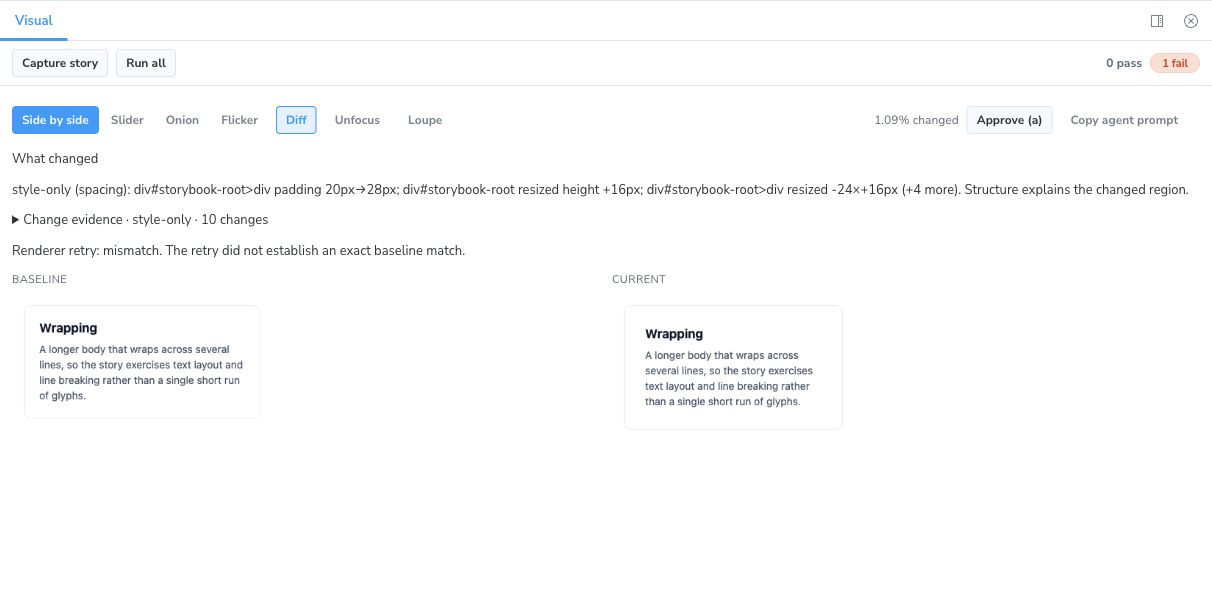
The agent can read the spacing change, inspect the rendered diff, and decide what to investigate next.
Design review comes before the regression baseline
The first implementation still needs review against the design. Juxtapose compares rendered captures; it does not import a Figma file or automatically certify design fidelity. A passing test means the implementation matches its approved baseline under the configured comparison policy.
Next: plan the reference review or capture your Storybook component.
External capability references checked October 16, 2026.